
Swagger:指定同一响应代码的两个响应
Swagger:指定同一响应代码的两个响应
在本文中,我们将编写一个允许为同一响应代码返回两个不同对象的API规范。我们将演示如何使用该规范生成Java代码和Swagger文档。
2. 问题介绍
让我们定义两个对象。一辆汽车(Car)具有所有者和车牌作为属性,两者都是字符串类型。另一方面,自行车(Bike)具有所有者和速度。速度是一个整数。
使用OpenAPI,这些定义对应于以下描述:
Car:
  type: object
  properties:
    owner:
      type: string
    plate:
      type: string
Bike:
  type: object
  properties:
    owner:
      type: string
    speed:
      type: integer
我们想要描述一个端点/vehicle,它将接受GET请求,并且能够返回一个汽车或自行车。 也就是说,我们要完成以下描述:
paths:
  /vehicle:
    get:
      responses:
        '200':
          # 返回汽车或自行车
我们将讨论OpenAPI 2和3规范的这个话题。
3. 在OpenAPI 3中使用两个不同的响应
OpenAPI版本3引入了_oneOf_,这正是我们所需要的。
3.1. 构建描述文件
在OpenAPI 3规范中,_oneOf_期望一个对象数组,并表示提供的值应该完全匹配给定对象中的一个:
schema:
  oneOf:
    - $ref: '#/components/schemas/Car'
    - $ref: '#/components/schemas/Bike'
此外,OpenAPI 3引入了展示各种响应示例的可能性。为了清晰起见,我们绝对想提供至少一个带有汽车的示例响应和另一个带有自行车的示例:
examples:
  car:
    summary: 汽车的示例
    value:
      owner: baeldung
      plate: AEX305
  bike:
    summary: 自行车的示例
    value:
      owner: john doe
      speed: 25
最后,让我们看看我们的整个描述文件:
openapi: 3.0.0
info:
  title: Demo api
  description: Demo api for the article 'specify two responses with same code based on optional parameter'
  version: 0.1.0
paths:
  /vehicle:
    get:
      responses:
        '200':
          description: Get a vehicle
          content:
            application/json:
              schema:
                oneOf:
                  - $ref: '#/components/schemas/Car'
                  - $ref: '#/components/schemas/Bike'
              examples:
                car:
                  summary: 汽车的示例
                  value:
                    owner: baeldung
                    plate: AEX305
                bike:
                  summary: 自行车的示例
                  value:
                    owner: john doe
                    speed: 25
components:
  schemas:
    Car:
      type: object
      properties:
        owner:
          type: string
        plate:
          type: string
    Bike:
      type: object
      properties:
        owner:
          type: string
        speed:
          type: integer
3.2. 生成Java类
现在,我们将使用我们的YAML文件来生成我们的API接口。 两个_maven_插件,swagger-codegen_和_openapi-generator,可以用来从_api.yaml_文件生成Java代码。截至6.0.1版本,openapi-generator_不处理_oneOf,所以我们将在本文中坚持使用_swagger-codegen_。
我们将使用以下配置为swagger-codegen插件:
``<plugin>``
    ```<groupId>```io.swagger.codegen.v3```</groupId>```
    ```<artifactId>```swagger-codegen-maven-plugin```</artifactId>```
    ```<version>```3.0.52```</version>```
    ``<executions>``
        ``<execution>``
            ``<goals>``
                ``<goal>``generate``</goal>``
            ``</goals>``
            ``<configuration>``
                ``<inputSpec>``${project.basedir}/src/main/resources/static/api.yaml``</inputSpec>``
                ``<language>``spring``</language>``
                ``<configOptions>``
                    ``<java8>``true``</java8>``
                    ``<interfaceOnly>``true``</interfaceOnly>``
                ``</configOptions>``
            ``</configuration>``
        ``</execution>``
    ``</executions>``
``</plugin>``
让我们注意,我们决定切换选项以仅生成接口,以节省生成许多对我们不太感兴趣的文件。
现在让我们执行插件:
mvn clean compile
我们现在可以看看生成的文件:
- 生成了_Car_和_Bike_对象
- 生成了_OneOfinlineResponse200_接口,以表示可以是_Car_或_Bike_的对象,这要归功于使用_@JsonSubTypes_注释
- _InlineResponse200_是_OneOfinlineResponse200_的基类实现
- VehicleApi_定义了端点:对这个端点的get请求返回一个_InlineResponse200
3.3. 生成Swagger UI文档
要从我们的YAML描述文件生成Swagger UI文档,我们将使用_springdoc-openapi_。让我们将依赖项添加到_pom.xml_中的_springdoc-openapi-ui_:
`<dependency>`
    ```<groupId>```org.springdoc```</groupId>```
    ```<artifactId>```springdoc-openapi-ui```</artifactId>```
    ```<version>```1.6.10```</version>```
`</dependency>`
_springdoc-openapi-ui_的1.6.10版本依赖于_swagger-ui_版本4.13.2,它正确处理_oneOf_和各种响应示例。
要从YAML文件生成Swagger UI文档,我们需要声明一个_SpringBootApplication_并添加以下三个bean:
@Bean
SpringDocConfiguration springDocConfiguration() {
    return new SpringDocConfiguration();
}

@Bean
SpringDocConfigProperties springDocConfigProperties() {
    return new SpringDocConfigProperties();
}

@Bean
ObjectMapperProvider objectMapperProvider(SpringDocConfigProperties springDocConfigProperties) {
    return new ObjectMapperProvider(springDocConfigProperties);
}
最后但同样重要的是,我们需要确保我们的YAML描述在_resources/static_目录中,并更新_application.properties_以指定我们不想从_Controllers_生成Swagger UI,而是从YAML文件:
springdoc.api-docs.enabled=false
springdoc.swagger-ui.url=/api.yaml
我们现在可以启动我们的应用程序:
mvn spring-boot:run
Swagger UI可以通过_http://localhost:8080/swagger-ui/index.html_访问。
我们可以看到有一个下拉菜单可以在_Car_和_Bike_示例之间导航:

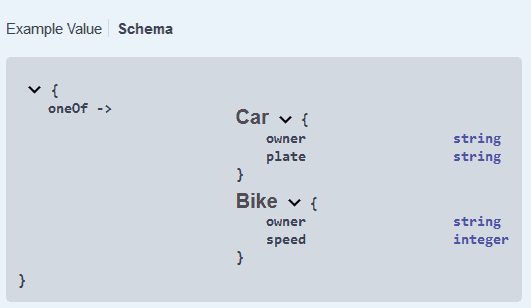
响应_Schema_也正确呈现:
4. 在OpenAPI 2中使用两个不同的响应
在OpenAPI 2中,_oneOf_不存在。所以让我们找一个替代方案。
4.1. 构建描述文件
我们能做的最好的就是定义一个包装对象,它将拥有_Car_和_Bike_的所有属性。 公共属性将是必需的,而只属于其中一个的属性将保持可选:
CarOrBike:
  description: 汽车将拥有所有者和车牌,而自行车拥有所有者和速度
  type: object
  required:
    - owner
  properties:
    owner:
      type: string
    plate:
      type: string
    speed:
      type: integer
我们的API响应将是一个_CarOrBike_对象。我们将在描述中添加更多的见解。不幸的是,我们不能添加各种示例,所以我们决定只给出一个汽车的示例。
让我们看看结果的_api.yaml_:
swagger: 2.0.0
info:
  title: Demo api
  description: Demo api for the article 'specify two responses with same code based on optional parameter'
  version: 0.1.0
paths:
  /vehicle:
    get:
      responses:
        '200':
          description: Get a vehicle. Can contain either a Car or a Bike
          schema:
            $ref: '#/definitions/CarOrBike'
          examples:
            application/json:
              owner: baeldung
              plate: AEX305
              speed:
definitions:
  Car:
    type: object
    properties:
      owner:
        type: string
      plate:
        type: string
  Bike:
    type: object
    properties:
      owner:
        type: string
      speed:
        type: integer
  CarOrBike:
    description: 汽车将拥有所有者和车牌,而自行车拥有所有者和速度
    type: object
    required:
      - owner
    properties:
      owner:
        type: string
      plate:
        type: string
      speed:
        type: integer
4.2. 生成Java类
让我们适应我们的swagger-codegen插件配置以解析OpenAPI 2文件。为此,我们需要使用插件的2.x版本。 它也位于另一个包中:
``<plugin>``
    ```<groupId>```io.swagger```</groupId>```
    ```<artifactId>```swagger-codegen-maven-plugin```</artifactId>```
    ```<version>```2.4.27```</version>```
    ``<executions>``
        ``<execution>``
            ``<goals>``
                ``<goal>``generate``</goal>``
            ``</goals>``
            ``<configuration>``
                ``<inputSpec>``${project.basedir}/src/main/resources/static/api.yaml``</inputSpec>``
                ``<language>``spring``</language>``
                ``<configOptions>``
                    ``<java8>``true``</java8>``
                    ``<interfaceOnly>``true``</interfaceOnly>``
                ``</configOptions>``
            ``</configuration>``
        ``</execution>``
    ``</executions>``
``</plugin>``
现在让我们看看生成的文件:
- CarOrBike对象包含了预期的字段,其中owner是_@NotNull_
- VehicleApi定义了端点:对这个端点的get请求返回一个_CarOrBike_
4.3. 生成Swagger UI文档
我们可以像3.3中那样生成文档。
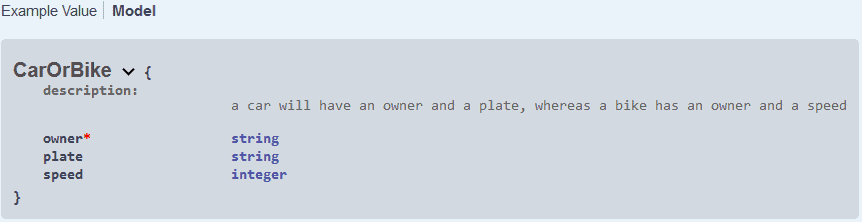
我们可以看到我们的描述显示出来了:

我们的_CarOrBike_模型也按预期描述:
5. 结论
在本教程中,我们了解了如何编写一个可以返回一个对象或另一个对象的端点的OpenAPI规范。我们使用YAML描述文件通过_swagger-codegen_生成Java代码,并使用_springdoc-openapi-ui_生成Swagger UI文档。
像往常一样,代码可以在GitHub上找到。
OK