
在Java中使用通配符字符串查找文件
在Java中使用通配符字符串查找文件
1. 概述
在本教程中,我们将学习如何在Java中使用通配符字符串查找文件。
2. 引言
在编程领域,glob 是一种带有通配符的模式,用于匹配文件名。我们将使用glob模式来过滤我们的示例中的文件名列表。我们将使用流行的通配符“*”和“?”。Java自Java SE 7以来就支持此功能。
Java在其_FileSystem_类中提供了_getPathMatcher()_方法。它可以采用正则表达式(regex)或glob模式。 我们将在本示例中使用glob模式,因为与正则表达式相比,应用通配符更为简单。
让我们来看一个使用glob模式的此方法的示例:
String pattern = "myCustomPattern";
PathMatcher matcher = FileSystems.getDefault().getPathMatcher("glob:" + pattern);
以下是Java中glob模式的一些示例:
| Glob | 描述 |
|---|---|
| *.java | 匹配所有扩展名为“java”的文件 |
| *. | 匹配所有扩展名为“java”或“class”的文件 |
| . | 匹配文件名中某处有“.”的所有文件 |
| ???? | 匹配文件名中有四个字符的所有文件 |
| [test].docx | 匹配文件名为‘t’, ‘e’, ‘s’, 或 ‘t’和“docx”扩展名的所有文件 |
| [0-4].csv | 匹配文件名为‘0’, ‘1’, ‘2’, ‘3’, 或 ‘4’和“csv”扩展名的所有文件 |
| C:\temp\* | 在Windows系统上匹配“C:\temp”目录中的所有文件 |
| src/test/* | 在基于Unix的系统上匹配“src/test/”目录中的所有文件 |
3. 实现
让我们深入了解实现此解决方案的细节。完成此任务有两个步骤。
首先,我们创建一个方法,它接受两个参数——要搜索的根目录和一个通配符模式。 此方法将包含访问每个文件和目录的编程逻辑,使用glob模式,并最终返回匹配文件名的列表。
其次,我们使用Java提供的_Files_类的_walkFileTree_方法来调用我们的搜索过程。
首先,让我们创建我们的_SearchFileByWildcard_类,其中包含一个_searchWithWc()_方法,它接受_Path_和_String_模式作为参数:
class SearchFileByWildcard {
    static List`````````<String>````````` matchesList = new ArrayList`````````<String>`````````();
    List`````````<String>````````` searchWithWc(Path rootDir, String pattern) throws IOException {
        matchesList.clear();
        FileVisitor``<Path>`` matcherVisitor = new SimpleFileVisitor``<Path>``() {
            @Override
            public FileVisitResult visitFile(Path file, BasicFileAttributes attribs) throws IOException {
                FileSystem fs = FileSystems.getDefault();
                PathMatcher matcher = fs.getPathMatcher("glob:" + pattern);
                Path name = file.getFileName();
                if (matcher.matches(name)) {
                    matchesList.add(name.toString());
                }
                return FileVisitResult.CONTINUE;
            }
        };
        Files.walkFileTree(rootDir, matcherVisitor);
        return matchesList;
    }
}
要访问_rootDir_中的文件,我们使用_FileVisitor_接口。一旦我们通过调用_getDefault()_方法获得文件系统的接口,我们就使用_FileSystem_类的_getPathMatcher()_方法。这就是我们在_rootDir_中的各个文件路径上应用glob模式的地方。
在我们的情况下,我们可以使用结果的_PathMatcher_来获取匹配文件名的_ArrayList_。
最后,我们调用NIO _Files_类的_walkFileTree_方法。文件遍历从_rootDir_开始,以深度优先的方式递归访问树中的每个节点。_matcherVisitor_包含_SimpleFileVisitor_类中_visitFile_方法的实现。
现在我们已经讨论了基于通配符的文件搜索的实现,让我们看看一些示例输出。我们将使用以下文件结构作为我们的示例:
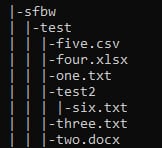
如果我们传递一个带有“glob:*.{txt,docx}”模式的_String_,我们的代码输出三个扩展名为“txt”的文件名和一个扩展名为“docx”的文件名:
SearchFileByWildcard sfbw = new SearchFileByWildcard();
List`````````<String>````````` actual = sfbw.searchWithWc(Paths.get("src/test/resources/sfbw"), "glob:*.{txt,docx}");

assertEquals(new HashSet`````````<String>`````````(Arrays.asList("six.txt", "three.txt", "two.docx", "one.txt")),
  new HashSet`````````<String>`````````(actual));
如果我们传递一个带有“glob:????.{csv}”模式的_String_,我们的代码输出一个文件名,该文件名有四个字符,后面跟着一个“.”和扩展名“csv”:
SearchFileByWildcard sfbw = new SearchFileByWildcard();
List`````````<String>````````` actual = sfbw.searchWithWc(Paths.get("src/test/resources/sfbw"), "glob:????.{csv}");

assertEquals(new HashSet`````````<String>`````````(Arrays.asList("five.csv")), new HashSet`````````<String>`````````(actual));
4. 结论
在本教程中,我们学习了如何在Java中使用通配符模式搜索文件。
源代码可在GitHub上获得。