
在Spring中获取Keycloak用户ID
在Spring中获取Keycloak用户ID
Keycloak是一个开源的身份和访问管理(IAM)系统,与Spring Boot应用程序集成良好。在本教程中,我们将描述如何在Spring Boot应用程序中获取Keycloak用户ID。
1. 概述
Keycloak提供了诸如保护REST API、用户联合、细粒度授权、社交登录、双因素认证(2FA)等功能。此外,我们可以使用它来使用OpenID Connect(OIDC)实现单点登录(SSO)。假设我们有一个使用Keycloak通过OIDC保护的Spring Boot应用程序,我们想要在Spring Boot应用程序中获取用户ID。在这种情况下,我们需要在Spring Boot应用程序中获取访问令牌或安全上下文。
为了简化事情,我们将使用在Spring Boot应用程序中嵌入的Keycloak。假设我们正在使用在GitHub上可用的授权服务器项目。首先,我们将在嵌入的Keycloak服务器中定义领域_baeldung_中的_customerClient_客户端: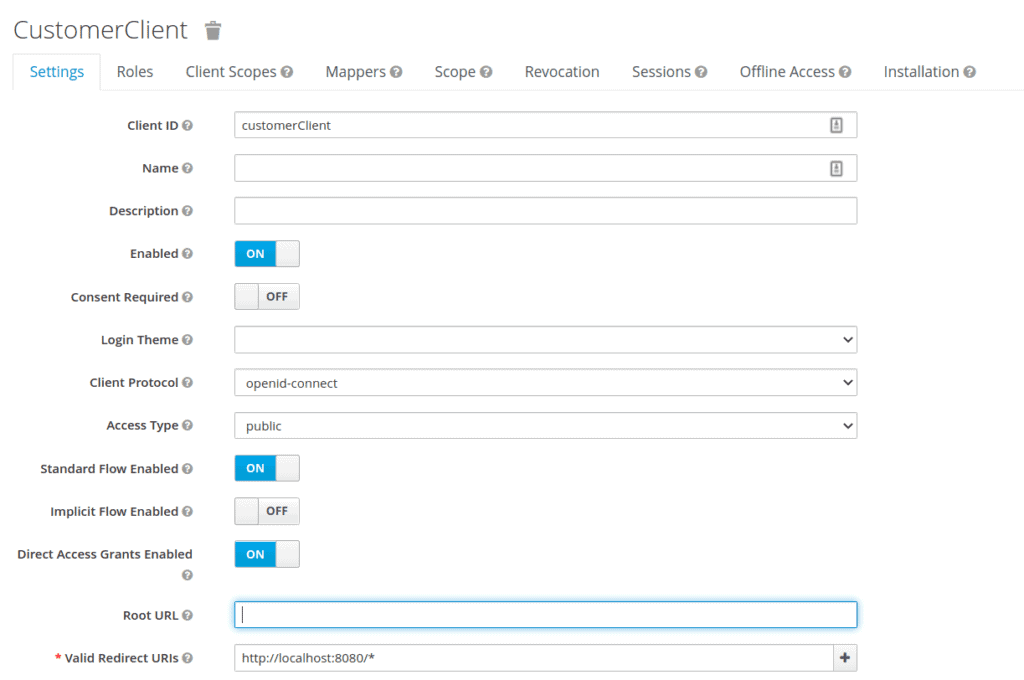 然后,我们将领域详细信息导出为_customer-realm.json_,并在_我们的_application-customer.yml_中设置领域文件:
keycloak:
  server:
    contextPath: /auth
    adminUser:
      username: bael-admin
      password: pass
    realmImportFile: customer-realm.json
最后,我们可以使用_–spring.profiles.active=customer_选项运行应用程序。现在,授权服务器已经准备好。运行服务器后,我们可以在_http://localhost:8083/auth/_访问授权服务器的欢迎页面。
2.2. 资源服务器
现在我们已经配置了授权服务器,让我们设置资源服务器。为此,我们将使用在GitHub上可用的资源服务器项目。首先,让我们将_application-embedded.properties_文件作为资源添加:
keycloak.auth-server-url=http://localhost:8083/auth
keycloak.realm=baeldung
keycloak.resource=customerClient
keycloak.public-client=true
keycloak.principal-attribute=preferred_username
现在,资源服务器使用OAuth2授权服务器进行安全保护,我们必须登录到SSO服务器才能访问资源。我们可以运行应用程序,使用_–spring.profiles.active=embedded_选项。
从Keycloak获取用户ID可以通过使用客户端映射器来完成。
3.1. 客户端映射器
我们可以在客户端映射器中添加用户ID,并在Spring Boot应用程序中获取它。首先,在_customerClient_客户端中定义一个客户端映射器:
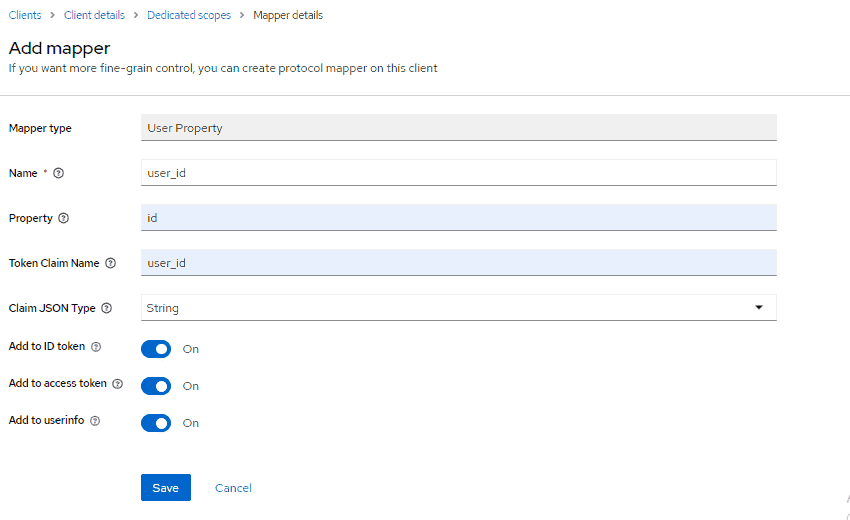
然后,在_CustomUserAttrController_类中获取用户ID:
@Controller
public class CustomUserAttrController {

    @GetMapping(path = "/users")
    public String getUserInfo(Model model) {

        final DefaultOidcUser user = (DefaultOidcUser) SecurityContextHolder.getContext()
            .getAuthentication()
            .getPrincipal();

        String userId = "";

        OidcIdToken token = user.getIdToken();

        Map`<String, Object>` customClaims = token.getClaims();

        if (customClaims.containsKey("user_id")) {
            userId = String.valueOf(customClaims.get("user_id"));
        }

        model.addAttribute("username", user.getName());
        model.addAttribute("userID", userId);
        return "userInfo";
    }

}
我们使用_IDToken_的_getClaims()_方法来获取映射器。然后,我们将用户ID添加到模型属性中。
3.2. Thymeleaf
我们将修改_userInfo.html_模板以显示用户ID信息:
`<div id="container">`
    `<h1>`
        User ID : `<span th:text="${userID}">`--userID--`</span>`.
    `</h1>`
`</div>`
3.3. 测试
运行应用程序后,我们可以导航到_http://localhost:8081/users_。输入_baeldung:baeldung_作为凭据,将返回以下内容:

4. 结论
在本文中,我们研究了如何在Spring Boot应用程序中从Keycloak获取用户ID。我们首先设置了调用安全应用程序所需的环境。然后,我们描述了使用_IDToken_和客户端映射器在Spring Boot应用程序中获取Keycloak用户ID。像往常一样,本教程的完整源代码可在GitHub上找到。此外,授权服务器的源代码也在GitHub上可用。

