
Spring Boot应用中JUnit测试控制器加载ApplicationContext失败
Spring Boot应用中JUnit测试控制器加载ApplicationContext失败
1. 概述
在Spring Boot应用中,混合定义Bean的方式包括基于注解和基于XML的配置。在这种环境下,我们可能想要在测试类中使用基于XML的配置。然而,在这种情况下,有时我们可能会遇到“加载ApplicationContext失败”的应用程序上下文加载错误。这个错误出现在测试类中,因为测试环境中没有加载应用程序上下文。
在本教程中,我们将讨论如何在Spring Boot应用中将XML应用程序上下文集成到测试中。
让我们通过在Spring Boot应用中集成基于XML的应用程序上下文来重现错误。
首先,假设我们有一个定义了服务Bean的_application-context.xml_文件:
``<?xml version="1.0" encoding="UTF-8"?>``
`<beans xmlns="http://www.springframework.org/schema/beans"
    xmlns:xsi="http://www.w3.org/2001/XMLSchema-instance"
    xsi:schemaLocation="
    http://www.springframework.org/schema/beans
    http://www.springframework.org/schema/beans/spring-beans.xsd">`

    `<bean id="employeeServiceImpl" class="com.baeldung.xmlapplicationcontext.service.EmployeeServiceImpl" />`
``</beans>``
现在我们可以将_application-context.xml_文件添加到_webapp/WEB-INF/_位置:
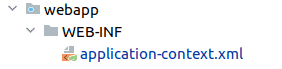
我们还将创建服务接口和类:
public interface EmployeeService {
    Employee getEmployee();
}

public class EmployeeServiceImpl implements EmployeeService {

    @Override
    public Employee getEmployee() {
        return new Employee("Baeldung", "Admin");
    }
}
最后,我们将创建一个测试用例,用于从应用程序上下文中获取_EmployeeService_ Bean:
@RunWith(SpringRunner.class)
@ContextConfiguration(locations={"classpath:WEB-INF/application-context.xml"})
public class EmployeeServiceAppContextIntegrationTest {

    @Autowired
    private EmployeeService service;

    @Test
    public void whenContextLoads_thenServiceISNotNull() {
        assertThat(service).isNotNull();
    }

}
现在如果我们尝试运行这个测试,我们会观察到错误:
java.lang.IllegalStateException: Failed to load ApplicationContext
这个错误出现在测试类中,因为测试上下文中没有加载应用程序上下文。此外,根本原因是_WEB-INF_没有包含在类路径中:
@ContextConfiguration(locations={"classpath:WEB-INF/application-context.xml"})
3. 在测试中使用基于XML的_ApplicationContext_
让我们看看如何在测试类中使用基于XML的_ApplicationContext_。我们有两种选项在测试中使用基于XML的_ApplicationContext_:@SpringBootTest_和@ContextConfiguration_注解。
3.1. 使用_@SpringBootTest_和_@ImportResource_进行测试
Spring Boot提供了_@SpringBootTest_注解,我们可以使用它来创建一个用于测试的应用程序上下文。此外,我们必须在Spring Boot主类中使用_@ImportResource_来读取XML Bean。这个注解允许我们导入一个或多个包含Bean定义的资源。
首先,让我们在主类中使用_@ImportResource_注解:
@SpringBootApplication
@ImportResource({"classpath*:application-context.xml"})
现在让我们为从应用程序上下文中获取_EmployeeService_ Bean创建一个测试用例:
@RunWith(SpringRunner.class)
@SpringBootTest(classes = XmlBeanApplication.class)
public class EmployeeServiceAppContextIntegrationTest {

    @Autowired
    private EmployeeService service;

    @Test
    public void whenContextLoads_thenServiceISNotNull() {
        assertThat(service).isNotNull();
    }

}
@ImportResource_注解加载位于_resource_目录中的XML Bean。此外,@SpringBootTest_注解加载整个应用的Bean到测试类中。因此,我们能够在测试类中访问_EmployeeService_ Bean。
3.2. 使用_@ContextConfiguration_与_resources_进行测试
我们可以通过将测试配置文件放置在_src/test/resources_目录中来创建具有不同Bean配置的测试上下文。
在这种情况下,我们使用_@ContextConfiguration_注解从_src/test/resources_目录加载测试上下文。
首先,让我们从_EmployeeService_接口创建另一个Bean:
public class EmployeeServiceTestImpl implements EmployeeService {

    @Override
    public Employee getEmployee() {
        return new Employee("Baeldung-Test", "Admin");
    }
}
然后我们将在_src/test/resources_目录中创建_test-context.xml_文件:
``<?xml version="1.0" encoding="UTF-8"?>``
`<beans xmlns="http://www.springframework.org/schema/beans"
    xmlns:xsi="http://www.w3.org/2001/XMLSchema-instance"
    xsi:schemaLocation="http://www.springframework.org/schema/beans
    http://www.springframework.org/schema/beans/spring-beans.xsd">`

    `<bean id="employeeServiceTestImpl" class="process.service.EmployeeServiceTestImpl" />`
``</beans>``
最后,我们将创建测试用例:
@SpringBootTest
@ContextConfiguration(locations = "/test-context.xml")
public class EmployeeServiceTestContextIntegrationTest {

    @Autowired
    @Qualifier("employeeServiceTestImpl")
    private EmployeeService serviceTest;

    @Test
    public void whenTestContextLoads_thenServiceTestISNotNull() {
        assertThat(serviceTest).isNotNull();
    }

}
在这里我们使用_@ContextConfiguration_注解从_test-context.xml_加载了_employeeServiceTestImpl_。
3.3. 使用_@ContextConfiguration_与_WEB-INF_进行测试
我们也可以从_WEB-INF_目录导入应用程序上下文到测试类中。为此,我们可以使用其_file_ URL来定位应用程序上下文:
@RunWith(SpringRunner.class)
@ContextConfiguration(locations = "file:src/main/webapp/WEB-INF/application-context.xml")
4. 结论
在本文中,我们学习了如何在Spring Boot应用的测试类中使用基于XML的配置文件。和往常一样,本文中使用的所有源代码都可以在GitHub上找到。