
如何在Java中重用Testcontainers
如何在Java中重用Testcontainers
在本教程中,我们将学习如何在本地开发和测试环境中设置环境时重用Testcontainers。
首先,我们必须确保在应用程序停止或测试套件完成时不关闭容器。之后,我们将讨论Testcontainer特定的配置,并讨论使用Testcontainers桌面应用程序的好处。最后,我们需要记住,重用Testcontainers是一个实验性功能,目前还不适合在CI流水线中使用。
2. 确保Testcontainer不被停止
通过@_Testcontainers和@_Container注解,我们可以简单地为我们的单元测试启用Testcontainers。
让我们编写一个测试,启动一个Spring Boot应用程序,并允许它连接到在Docker容器中运行的MongoDB数据库:
@Testcontainers
@SpringBootTest
class ReusableContainersLiveTest {

    @Container
    static MongoDBContainer mongoDBContainer = new MongoDBContainer(DockerImageName.parse("mongo:4.0.10"));

    // 动态属性和测试用例
}
然而,Testcontainer的JUnit5扩展在自动启动_MongoDBContainer_时也会在测试后关闭它。因此,让我们移除_@Testcontainers_和@_Container_注解,并手动启动容器:
@SpringBootTest
class ReusableContainersLiveTest {
    static MongoDBContainer mongoDBContainer = new MongoDBContainer(DockerImageName.parse("mongo:4.0.10"));

    @BeforeAll
    static void beforeAll() {
        mongoDBContainer.start();
    }

    // 动态属性和测试用例
}
另一方面,我们可能在本地开发期间使用Spring Boot内置的Testcontainers支持。在这种情况下,我们不会使用JUnit 5扩展,这一步是不必要的。
3. 管理Testcontainer生命周期
现在,我们可以完全控制容器的生命周期。我们可以配置应用程序重用现有的Testcontainer,并且我们可以手动从终端停止它。
3.1. withReuse()方法
我们可以通过使用其流畅API的_withReuse()_方法将Testcontainer标记为可重用:
static MongoDBContainer mongoDBContainer = new MongoDBContainer(DockerImageName.parse("mongo:4.0.10"))
  .withReuse(true);
当我们第一次运行测试时,我们将看到Testcontainers日志中关于启动_MongoDBContainer_的常规信息。这通常需要几秒钟:
23:56:42.383 [main] INFO tc.mongo:4.0.10 - Creating container for image: mongo:4.0.10
23:56:42.892 [main] INFO tc.mongo:4.0.10 - Container mongo:4.0.10 is starting: d5fa298bf6...
23:56:45.470 [main] INFO tc.mongo:4.0.10 - Container mongo:4.0.10 started in PT3.11239S
测试完成后,我们应该能够看到容器仍在运行。例如,我们可以使用_docker ps_命令从终端进行检查:
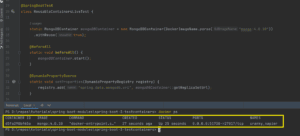
此外,当我们重新运行测试时,只要配置没有改变,容器就会被重用。结果,容器设置时间显著减少:
00:12:23.859 [main] INFO tc.mongo:4.0.10 - Creating container for image: mongo:4.0.10
00:12:24.190 [main] INFO tc.mongo:4.0.10 - Reusing container with ID: d5fa298b... and hash: 0702144b...
00:12:24.191 [main] INFO tc.mongo:4.0.10 - Reusing existing container (d5fa298b...) and not creating a new one
00:12:24.398 [main] INFO tc.mongo:4.0.10 - Container mongo:4.0.10 started in PT0.5555088S
最后,重用的数据库包含之前插入的文档。虽然这可能对本地开发有用,但可能对测试有害。如果我们需要重新开始,我们可以在每个测试之前简单地清除集合。
3.2. Testcontainers配置
在某些情况下,可能会发生警告,指出“请求重用,但环境不支持容器的重用”。当在我们的本地Testcontainers配置中禁用重用时会发生这种情况:
00:23:09.461 [main] INFO tc.mongo:4.0.10 - Creating container for image: mongo:4.0.10
00:23:09.463 [main] WARN tc.mongo:4.0.10 - Reuse was requested but the environment does not support the reuse of containers
要解决这个问题,我们可以简单地编辑_.testcontainers.properties_文件,并将_reuse_设置为启用:
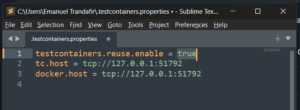
3.3. 停止容器
我们可以随时从终端手动停止Docker容器。为此,我们只需要运行_docker stop_命令,然后是容器ID。应用程序的后续执行将启动一个新的Docker容器。
4. Testcontainers桌面
我们可以安装Testcontainers桌面应用程序来轻松管理Testcontainers的生命周期和配置。
该应用程序需要身份验证,但我们可以使用GitHub账户轻松登录。登录后,我们将在工具栏中看到Testcontainers图标。如果我们点击它,我们将有几个选项可供选择:
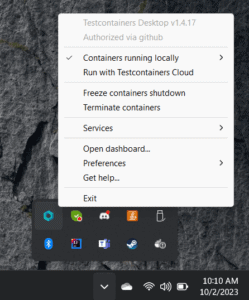
现在,执行前面演示的步骤就像点击按钮一样简单。例如,我们可以通过_Preferences > Enable reusable containers_轻松启用或禁用可重用容器。此外,如果我们需要更多的调试,我们有能力在关闭之前终止容器或冻结它们。
5. 结论
在本文中,我们学习了如何在Java中重用Testcontainers。我们发现JUnit 5可能会在完成执行之前尝试关闭容器。我们通过手动启动容器而不是依赖Testcontainers的JUnit 5扩展来避免这个问题。
之后,我们讨论了_withReuse()_方法和其他Testcontainer特定的配置。最后,我们安装了Testcontainers桌面应用程序,并看到了它在管理Testcontainers生命周期时如何成为宝贵的资产。
如往常一样,本文中使用的全部代码可以在GitHub上找到。翻译已经完成,以下是文章的结尾部分:


OK