
使用Feign客户端发送SOAP对象
使用Feign客户端发送SOAP对象
Feign抽象了HTTP调用,并使其声明式化。通过这样做,Feign隐藏了底层细节,如HTTP连接管理、硬编码的URL和其他样板代码。使用Feign客户端的一个显著优势是使HTTP调用变得简单,并消除了大量的代码。通常,我们使用Feign来处理REST API的_application/json_媒体类型。然而,Feign客户端也可以很好地处理其他媒体类型,如_text/xml_、多部分请求等。
在本教程中,我们将学习如何使用Feign调用基于SOAP的Web服务(text/xml)。
2. SOAP Web Service
假设有一个SOAP Web服务,包含两个操作——getUser_和_createUser。
让我们使用cURL调用_createUser_操作:
curl -d @request.xml -i -o -X POST --header 'Content-Type: text/xml'
  http://localhost:18080/ws/users
这里,_request.xml_包含SOAP负载:
`<soapenv:Envelope xmlns:soapenv="http://schemas.xmlsoap.org/soap/envelope/"
  xmlns:feig="http://www.baeldung.com/springbootsoap/feignclient">`
    ``<soapenv:Header/>``
    ``<soapenv:Body>``
         ``<feig:createUserRequest>``
             ``<feig:user>``
                 ``<feig:id>``1``</feig:id>``
                 ``<feig:name>``john doe``</feig:name>``
                 ``<feig:email>``john.doe@gmail.com``</feig:email>``
             ``</feig:user>``
         ``</feig:createUserRequest>``
    ``</soapenv:Body>``
``</soapenv:Envelope>``
如果所有配置都正确,我们将获得一个成功的响应:
`<SOAP-ENV:Envelope xmlns:SOAP-ENV="http://schemas.xmlsoap.org/soap/envelope/">`
    ``<SOAP-ENV:Header/>``
    ``<SOAP-ENV:Body>``
        `<ns2:createUserResponse xmlns:ns2="http://www.baeldung.com/springbootsoap/feignclient">`
            ``<ns2:message>``Success! Created the user with id - 1``</ns2:message>``
        ``</ns2:createUserResponse>``
    ``</SOAP-ENV:Body>``
``</SOAP-ENV:Envelope>``
类似地,其他操作_getUser_也可以使用cURL调用。
3. 依赖项
接下来,让我们看看如何使用Feign调用这个SOAP Web服务。让我们开发两个不同的客户端来调用SOAP服务。Feign支持多种现有的HTTP客户端,如Apache HttpComponents、OkHttp、_java.net.URL_等。让我们使用Apache _HttpComponents_作为我们的底层HTTP客户端。首先,让我们为OpenFeign Apache HttpComponents添加依赖项:
```<dependency>```
    `````<groupId>`````io.github.openfeign`````</groupId>`````
    `````<artifactId>`````feign-hc5`````</artifactId>`````
    `````<version>`````11.8````</version>````
```</dependency>```
在接下来的部分中,让我们学习几种使用Feign调用SOAP Web服务的方法。
4. 作为纯文本的SOAP对象
我们可以将SOAP请求作为纯文本发送,将_content-type_和_accept_头设置为_text/xml_。现在,让我们开发一个演示这种方法的客户端:
public interface SoapClient {
    @RequestLine("POST")
    @Headers({"SOAPAction: createUser", "Content-Type: text/xml;charset=UTF-8",
      "Accept: text/xml"})
    String createUserWithPlainText(String soapBody);
}
这里,createUserWithPlainText_接受一个_String SOAP负载。注意,我们显式定义了_accept_和_content-type_头。这是因为在发送SOAP正文作为文本时,必须将_Content-Type_和_Accept_头指定为_text/xml_。
这种方法的一个缺点是我们必须事先知道SOAP负载。幸运的是,如果WSDL可用,可以使用开源工具如SoapUI生成负载。一旦负载准备好,让我们使用Feign调用SOAP Web服务:
@Test
void givenSOAPPayload_whenRequest_thenReturnSOAPResponse() throws Exception {
    String successMessage="Success! Created the user with id";
    SoapClient client = Feign.builder()
       .client(new ApacheHttp5Client())
       .target(SoapClient.class, "http://localhost:18080/ws/users/");

    assertDoesNotThrow(() -> client.createUserWithPlainText(soapPayload()));

    String soapResponse= client.createUserWithPlainText(soapPayload());

    assertNotNull(soapPayload());
    assertTrue(soapResponse.contains(successMessage));
}
Feign支持记录SOAP消息和其他HTTP相关信息。这些信息对于调试至关重要。因此,让我们启用Feign日志记录。记录这些消息需要额外的_feign-slf4j_依赖项:
```<dependency>```
    `````<groupId>`````io.github.openfeign`````</groupId>`````
    `````<artifactId>`````feign-slf4j`````</artifactId>`````
    `````<version>`````11.8````</version>````
```</dependency>```
让我们增强我们的测试用例以包括日志信息:
SoapClient client = Feign.builder()
  .client(new ApacheHttp5Client())
  .logger(new Slf4jLogger(SoapClient.class))
  .logLevel(Logger.Level.FULL)
  .target(SoapClient.class, "http://localhost:18080/ws/users/");
现在,当我们运行测试时,我们有类似的日志:
18:01:58.295 [main] DEBUG org.apache.hc.client5.http.wire - http-outgoing-0 >> "SOAPAction: createUser[\r][\n]"
18:01:58.295 [main] DEBUG org.apache.hc.client5.http.wire - http-outgoing-0 >> "`<soapenv:Envelope xmlns:soapenv=\"http://schemas.xmlsoap.org/soap/envelope/\" xmlns:feig=\"http://www.baeldung.com/springbootsoap/feignclient\">`"[\n]"
18:01:58.295 [main] DEBUG org.apache.hc.client5.http.wire - http-outgoing-0 >> " ``<soapenv:Header/>``[\n]"
18:01:58.295 [main] DEBUG org.apache.hc.client5.http.wire - http-outgoing-0 >> " ``<soapenv:Body>``[\n]"
18:01:58.295 [main] DEBUG org.apache.hc.client5.http.wire - http-outgoing-0 >> " ``<feig:createUserRequest>``[\n]"
18:01:58.295 [main] DEBUG org.apache.hc.client5.http.wire - http-outgoing-0 >> " ``<feig:user>``[\n]"
18:01:58.295 [main] DEBUG org.apache.hc.client5.http.wire - http-outgoing-0 >> " ``<feig:id>``1``</feig:id>``[\n]"
18:01:58.295 [main] DEBUG org.apache.hc.client5.http.wire - http-outgoing-0 >> " ``<feig:name>``john doe``</feig:name>``[\n]"
18:01:58.296 [main] DEBUG org.apache.hc.client5.http.wire - http-outgoing-0 >> " ``<feig:email>``john.doe@gmail.com``</feig:email>``[\n]"
18:01:58.296 [main] DEBUG org.apache.hc.client5.http.wire - http-outgoing-0 >> " ``</feig:user>``[\n]"
18:01:58.296 [main] DEBUG org.apache.hc.client5.http.wire - http-outgoing-0 >> " ``</feig:createUserRequest>``[\n]"
18:01:58.296 [main] DEBUG org.apache.hc.client5.http.wire - http-outgoing-0 >> " ``</soapenv:Body>``[\n]"
18:01:58.296 [main] DEBUG org.apache.hc.client5.http.wire - http-outgoing-0 >> "``</soapenv:Envelope>``"
18:01:58.300 [main] DEBUG org.apache.hc.client5.http.wire - http-outgoing-0 `<< "<SOAP-ENV:Envelope xmlns:SOAP-ENV=\"http://schemas.xmlsoap.org/soap/envelope/\">```<SOAP-ENV:Header/>````<SOAP-ENV:Body>```<ns2:createUserResponse xmlns:ns2=\"http://www.baeldung.com/springbootsoap/feignclient\">```<ns2:message>``Success! Created the user with id - 1``</ns2:message>````</ns2:createUserResponse>````</SOAP-ENV:Body>````</SOAP-ENV:Envelope>``"
5. Feign SOAP Codec
调用SOAP Web服务的一种更干净和更好的方法是使用Feign的SOAP Codec。该编解码器帮助编组(Java到SOAP)/解组(SOAP到Java)SOAP消息。然而,编解码器需要额外的_feign-soap_依赖项。因此,让我们声明这个依赖项:
```<dependency>```
    `````<groupId>`````io.github.openfeign`````</groupId>`````
    `````<artifactId>`````feign-soap`````</artifactId>`````
    `````<version>`````11.8</version```xml
```<dependency>```
    `````<groupId>`````io.github.openfeign`````</groupId>`````
    `````<artifactId>`````feign-soap`````</artifactId>`````
    `````<version>`````11.8````</version>````
```</dependency>```
Feign SOAP codec使用_JAXB_和_SoapMessage_以及_JAXBContextFactory_提供所需的编组器和解组器来编码和解码SOAP对象。
接下来,根据我们创建的XSD,让我们生成领域类。JAXB需要这些领域类来编组和解组SOAP消息。首先,让我们向我们的_pom.xml_添加一个插件:
`<plugin>`
    `````<groupId>`````org.jvnet.jaxb2.maven2`````</groupId>`````
    `````<artifactId>`````maven-jaxb2-plugin`````</artifactId>`````
    `````<version>`````0.14.0````</version>````
    `<executions>`
        `<execution>`
            `<id>`feign-soap-stub-generation`</id>`
            `<phase>`compile`</phase>`
            `<goals>`
                `<goal>`generate`</goal>`
            `</goals>`
            `<configuration>`
                `<schemaDirectory>`target/generated-sources/jaxb`</schemaDirectory>`
                `<schemaIncludes>`
                    `<include>`*.xsd`</include>`
                `</schemaIncludes>`
                `<generatePackage>`com.baeldung.feign.soap.client`</generatePackage>`
                `<generateDirectory>`target/generated-sources/jaxb`</generateDirectory>`
            `</configuration>`
        `</execution>`
    `</executions>`
`</plugin>`
在这里,我们配置了插件在_compile_阶段运行。现在,让我们生成存根:
mvn clean compile
构建成功后,_target_文件夹包含源代码:
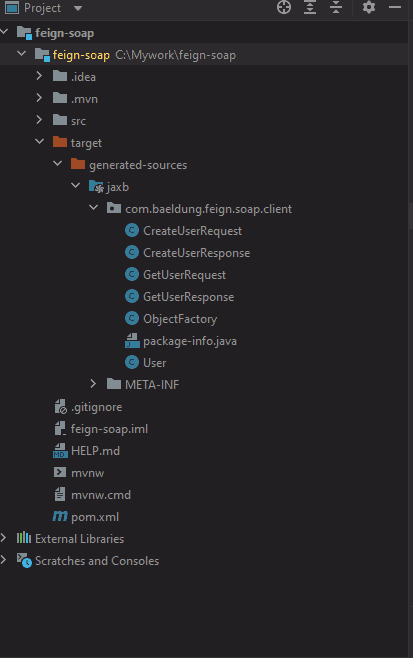
接下来,让我们使用这些存根和Feign调用SOAP Web服务。但首先,让我们向我们的_SoapClient_添加一个新方法:
@RequestLine("POST")
@Headers({"Content-Type: text/xml;charset=UTF-8"})
CreateUserResponse createUserWithSoap(CreateUserRequest soapBody);
接下来,让我们测试SOAP Web服务:
@Test
void whenSoapRequest_thenReturnSoapResponse() {
    JAXBContextFactory jaxbFactory = new JAXBContextFactory.Builder()
      .withMarshallerJAXBEncoding("UTF-8").build();
    SoapClient client = Feign.builder()
      .encoder(new SOAPEncoder(jaxbFactory))
      .decoder(new SOAPDecoder(jaxbFactory))
      .target(SoapClient.class, "http://localhost:18080/ws/users/");
    CreateUserRequest request = new CreateUserRequest();
    User user = new User();
    user.setId("1");
    user.setName("John Doe");
    user.setEmail("john.doe@gmail");
    request.setUser(user);
    CreateUserResponse response = client.createUserWithSoap(request);

    assertNotNull(response);
    assertNotNull(response.getMessage());
    assertTrue(response.getMessage().contains("Success"));
}
让我们增强我们的测试用例以记录HTTP和SOAP消息:
SoapClient client = Feign.builder()
  .encoder(new SOAPEncoder(jaxbFactory))
  .errorDecoder(new SOAPErrorDecoder())
  .logger(new Slf4jLogger())
  .logLevel(Logger.Level.FULL)
  .decoder(new SOAPDecoder(jaxbFactory))
  .target(SoapClient.class, "http://localhost:18080/ws/users/");
这段代码生成了我们之前看到的类似日志。
最后,让我们处理SOAP Faults。Feign提供了一个_SOAPErrorDecoder_,它将SOAP Fault作为_SOAPFaultException_返回。所以,让我们将这个_SOAPErrorDecoder_设置为Feign错误解码器并处理SOAP Faults:
SoapClient client = Feign.builder()
  .encoder(new SOAPEncoder(jaxbFactory))
  .errorDecoder(new SOAPErrorDecoder())
  .decoder(new SOAPDecoder(jaxbFactory))
  .target(SoapClient.class, "http://localhost:18080/ws/users/");
try {
    client.createUserWithSoap(request);
} catch (SOAPFaultException soapFaultException) {
    assertNotNull(soapFaultException.getMessage());
    assertTrue(soapFaultException.getMessage().contains("This is a reserved user id"));
}
在这里,如果SOAP Web服务抛出SOAP Fault,它将由_SOAPFaultException_处理。
6. 结论
在本文中,我们学习了如何使用Feign调用SOAP Web服务。Feign是一个声明式的HTTP客户端,可以轻松调用SOAP/REST Web服务。使用Feign的优势是它减少了代码行数。较少的代码行数导致较少的错误和较少的单元测试。
如往常一样,完整的源代码可在GitHub上获得。
OK