
Swagger中枚举的文档
Swagger中枚举的文档
1. 概述
在本教程中,我们将学习如何使用_swagger-maven-plugin_在Swagger中记录枚举,并在swagger编辑器中验证生成的JSON文档。
2. Swagger是什么?
Swagger是一个开源工具,用于定义基于REST的API。在当今世界,大多数组织都在向微服务和API优先方法发展。Swagger在设计和记录API方面非常有用。它还提供了各种工具,如Swagger编辑器、Swagger UI和Swagger CodeGen来协助API开发。
此外,Swagger是_OpenAPI_规范或_OAS_的实现,它定义了REST API开发的一套标准;因此,它帮助全球组织标准化编写API的过程。
由我们的应用程序生成的JSON文件也将遵循_OpenAPI_规范。
让我们尝试理解Swagger中枚举的重要性。一些API需要用户坚持使用一组特定的预定义值。这些预定义的常量值被称为枚举。类似地,当Swagger公开API时,我们希望确保用户从这个预定义的集合中选择一个值,而不是自由文本。换句话说,我们需要在我们的_swagger.json_文件中记录枚举,以便用户了解可能的值。
3. 实现
让我们以一个REST API为例,并跳转到实现。我们将实现一个POST API,为组织雇佣特定角色的员工。然而,角色只能是以下之一:Engineer(工程师)、Clerk(职员)、Driver(司机)或_Janitor_(清洁工)。
我们将创建一个名为_Role_的枚举,包含所有可能的员工角色值,并创建一个具有角色属性的_Employee_类。让我们看一下类及其关系的UML图,以便更好地理解:
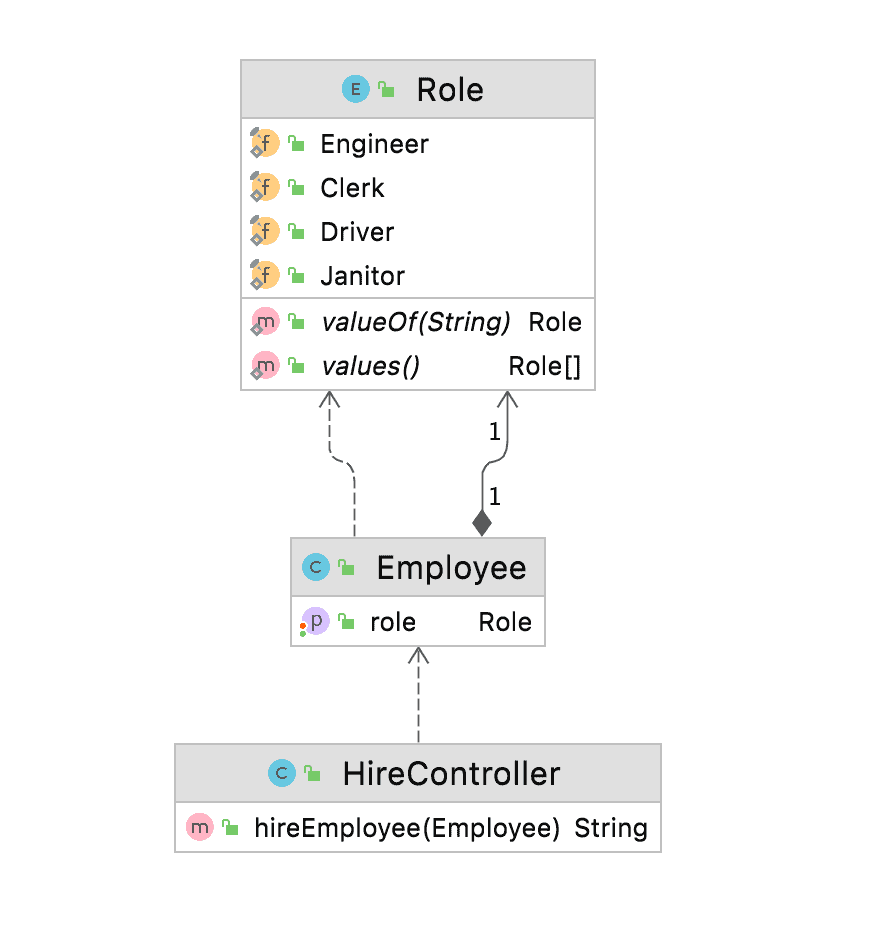
要在Swagger中记录这一点,首先,我们将导入并配置_swagger-maven-plugin_在我们的应用程序中。其次,我们将向我们的代码添加所需的注释,最后,我们将构建项目并在swagger编辑器中验证生成的swagger文档或_swagger.json_。
3.1. 导入并配置插件
我们将使用_swagger-maven-plugin_,我们需要将其作为依赖项添加到我们的应用程序的_pom.xml_中:
`<dependency>`
    ``<groupId>``com.github.kongchen``</groupId>``
    ``<artifactId>``swagger-maven-plugin``</artifactId>``
    ```<version>```3.1.1```</version>```
`</dependency>`
此外,为了配置并启用此插件,我们将在_pom.xml_的插件部分添加它:
- locations:此标签指定包含_@Api_的包或类,用分号分隔
- info:此标签提供API的元数据。Swagger-ui使用此数据显示信息
- swaggerDirectory:此标签定义_swagger.json_文件的路径
`<plugin>`
    ``<groupId>``com.github.kongchen``</groupId>``
    ``<artifactId>``swagger-maven-plugin``</artifactId>``
    ```<version>```3.1.1```</version>```
    `<configuration>`
        `<apiSources>`
            `<apiSource>`
                `<springmvc>`false`</springmvc>`
                `<locations>`com.baeldung.swaggerenums.controller`</locations>`
                `<schemes>`http,https`</schemes>`
                `<host>`baeldung.com`</host>`
                `<basePath>`/api`</basePath>`
                `<info>`
                    `<title>`Baeldung - Document Enum`</title>`
                    ```<version>```v1```</version>```
                    `<description>`This is a Baeldung Document Enum Sample Code`</description>`
                    `<contact>`
                        `<email>`pmurria@baeldung.com`</email>`
                        ``<name>``Test``</name>``
                    `</contact>`
                    `<license>`
                        `<url>`https://www.apache.org/licenses/LICENSE-2.0.html`</url>`
                        ``<name>``Apache 2.0``</name>``
                    `</license>`
                `</info>`
                `<swaggerDirectory>`generated/swagger-ui`</swaggerDirectory>`
            `</apiSource>`
        `</apiSources>`
    `</configuration>`
    `<executions>`
        `<execution>`
            `<phase>`compile`</phase>`
            `<goals>`
                `<goal>`generate`</goal>`
            `</goals>`
        `</execution>`
    `</executions>`
`</plugin>`
3.2. 记录枚举
为了在Swagger中记录枚举,我们需要使用注释_@ApiModel_声明模型。
在这个例子中,我们创建了一个有四个可能值的枚举_Role_——Engineer, Clerk, Driver, and Janitor。由于我们需要记录这个枚举,我们将在枚举_Role_上添加_@ApiModel_。换句话说,这将让Swagger知道模型的存在。在_Employee_类中,我们将用_@ApiModel_注释_Employee_,并用_@ApiModelProperty_注释_Role_。
我们的_Employee_、_Role_和_HireController_将如下所示:
@ApiModel
public class Employee {
    @ApiModelProperty
    public Role role;

   // 标准setter和getter
}
@ApiModel
public enum Role {
    Engineer, Clerk, Driver, Janitor;
}
接下来,我们将创建一个API,使用_@Path_为_“/hire”,并使用_Employee_模型作为_hireEmployee_方法的输入参数。我们必须在_HireController_上添加@Api_,以便_swagger-maven-plugin_知道并应考虑其进行文档记录:
@Api
@Path(value="/hire")
@Produces({"application/json"})
public class HireController {

    @POST
    @ApiOperation(value = "This method is used to hire employee with a specific role")
    public String hireEmployee(@ApiParam(value = "role", required = true) Employee employee) {
        return String.format("Hired for role: %s", employee.role.name());
    }
}
3.3. 生成Swagger文档
要构建我们的项目并生成swagger文档,运行以下命令:
mvn clean install
构建完成后,插件将在_生成/swagger-ui_或插件配置的位置生成_swagger.json_文件。在定义下,我们将看到枚举_Role_记录在员工属性中,包含其所有可能的值。
"definitions" : {
  "Employee" : {
    "type" : "object",
    "properties" : {
      "role" : {
        "type" : "string",
        "enum" : [ "Engineer", "Clerk", "Driver", "Janitor" ]
      }
    }
  }
}
现在,我们将使用在线swagger编辑器可视化生成的JSON,并查找枚举_Role_: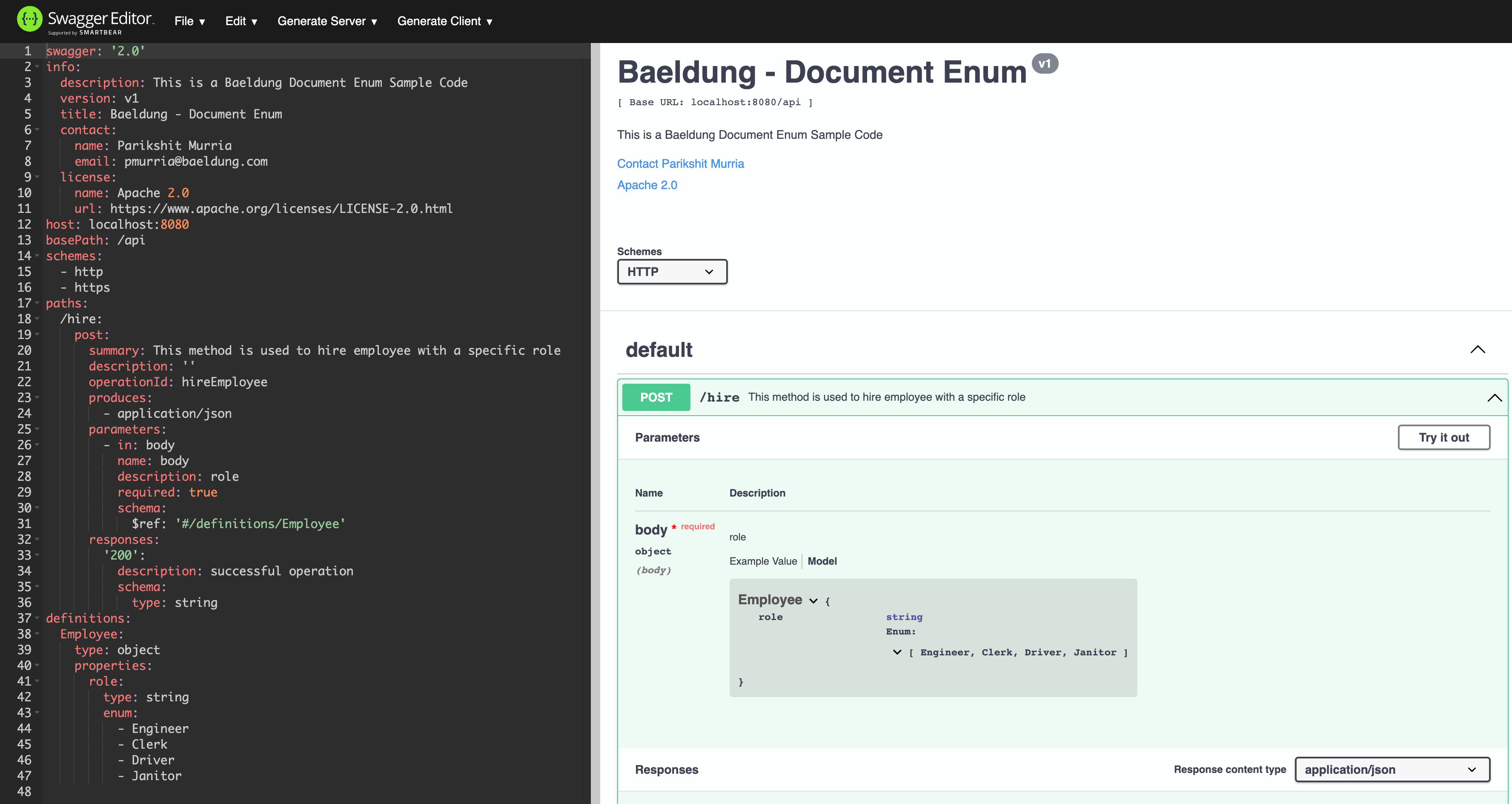
4. 结论
在本教程中,我们讨论了Swagger是什么以及_OpenAPI_规范及其在组织API开发中的重要性。此外,我们使用_swagger-maven-plugin_创建并记录了我们的示例API,其中包含枚举。最后,为了验证输出,我们使用swagger编辑器可视化了生成的JSON文档。
此实现可以在GitHub上找到。


OK